 OK…Christmas has already come and gone, I know, but it’s still technically the holiday season, and the title of this episode is the title of a Christmas CD project I recently designed. That’s the project I showcase in this episode, in which I demonstrate a holiday grab bag of InDesign goodies including: … (read more)
The InDesigner
InDesign Info
- Automation (3)
- Design (4)
- Designer's Bookshelf (2)
- Document Set-up (4)
- Graphics & Images (9)
- GREP (3)
- Interactivity (1)
- Layout (6)
- Listener Community (2)
- Long Documents (5)
- News/Announcements (24)
- Other Software (1)
- Podcasts-Audio (11)
- Podcasts-Video (35)
- Printing & Production (2)
- Productivity (14)
- Show Notes (1)
- Styles (9)
- Tables (6)
- The InDesigner (1)
- Transparency (7)
- Type & Text (16)
Posts By Date
- December 2007
- November 2007
- October 2007
- September 2007
- August 2007
- June 2007
- May 2007
- April 2007
- March 2007
- February 2007
- January 2007
- December 2006
- November 2006
- October 2006
- September 2006
- August 2006
- July 2006
- June 2006
- May 2006
- April 2006
- March 2006
- February 2006
- January 2006
- December 2005
- November 2005
- October 2005

Episode 46: Baby, It’s Christmas Time! (VIDEO)
December 29th, 2007 | by Michael Murphy
Episode 45: The Magnificent Six (VIDEO)
November 18th, 2007 | by Michael Murphy
Normally, I pick one InDesign feature and build a whole episode around it. However, this is the second anniversary of the podcast, and I wanted to do something different, and demonstrate that combining InDesign features is far more powerful than using them individually. In this episode, I use six different features … (read more)
Live from Washington, D.C.: It’s The InDesigner!
November 9th, 2007 | by Michael Murphy
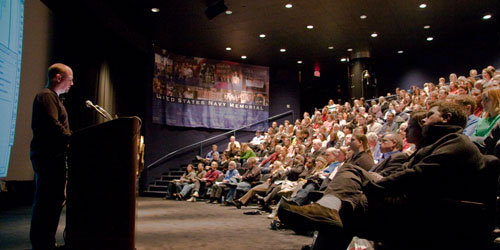
Last night, I delivered an expanded, 90-minute version of my “Styles Equal Substance” presentation to a record-setting audience of more than 250 people at the Washington, D.C. InDesign User Group meeting. It was an amazing experience. The crowd was energetic, had great questions and made a first-time visitor to the nation’s capitol feel right at home.
“Styles Equal Substance” has been so well-received in both Boston and D.C., that I’ll be presenting an hour-long version of it at the upcoming InDesign Conference in Miami (February 26 – March 1, 2008). If you can’t make it to Miami, you can get a glimpse at the extent of styles throughout the application by downloading the handout from the D.C. meeting.
Photo by Mitchell Osborne, courtesy of the InDesign User Group web site. See more photos from the meeting.
Episode 44: That’s a Wrap (VIDEO)
October 24th, 2007 | by Michael Murphy
It’s that little feature we all take for granted, but InDesign’s Text Wrap is a vast improvement over that other page layout application’s Runaround feature. This episode takes an in-depth look at all of InDesign’s Text Wrap options, reveals a few peculiarities … (read more)
Live from Boston: It’s The InDesigner
September 21st, 2007 | by Michael Murphy
Last night, I delivered two back-to-back presentations at the Boston InDesign User Group meeting. The first was called “Styles Equal Substance,” in which I took a big picture look at what, to me, is the warm, beating heart of the entire application: Styles. Styles are everywhere, and they’re connected to so many features, you can lose track of how it all comes together. Fortunately, I’ve combed through the application to discover all of the connections between styles and the features with which they interact. My handout posted on the InDesign User Group web site has a visual representation of styles everywhere in InDesign.
The topic for the second half of the meeting was “Understanding GREP,” which covered the new, advanced Find/Change capabilities built into InDesign CS3 under the GREP tab. This is an amazing new feature. For my money, it’s the best improvement of the entire upgrade and something I’ll be talking about a lot in upcoming episodes and in one of my sessions at The InDesign Conference in Miami in February. Can’t make it there or wait to learn more? Then take a look at my other handout for the GREP session that’s posted on the meeting notes section of the InDesign User Group web site.
Episode 43: Data Merge (VIDEO)
August 31st, 2007 | by Michael Murphy
Who says data and design are mutually exclusive? Not InDesign, that’s for sure. Under the right circumstances, data-driven layout is the way to go. Unlike XML, which makes designers run from their computers, the Data Merge feature in InDesign is an easy way to accomplish … (read more)
My Latest Article in InDesign Magazine
August 15th, 2007 | by Michael Murphy
The latest isssue of InDesign Magazine (#19-September 2007) features a cover story by yours truly about designing tables in InDesign. The focus is very much on the design challenges particular to tables, and how not to let the speed and ease-of-use of InDesign’s table features stop you from taking the time to improve your rows and columns with time-honored design principles. The article is also posted online as a free PDF download on CreativePro.com.
But do yourself a real favor and take advantage of my promo code — “theindesigner” — when you subscribe to InDesign Magazine. You’ll get a two-year subscription, plus every back issue. It’s probably the best money you can spend on improving your InDesign knowledge.
Episode 42: Summer Movie Spectacular! (VIDEO)
August 2nd, 2007 | by Michael Murphy
Who wants to see the home videos from my vacation? Wait! Before you run for the exits, let me rephrase that: Who wants to learn about how to add and work with videos in InDesign, create buttons to control them, and export PDFs that will play them? In this episode, you’ll learn how to put these great features to work, what limitations to be aware of, and how to … (read more)
Episode 41: Quick Tip – Place Every Logo (VIDEO)
June 15th, 2007 | by Michael Murphy
How would you like to have all versions of your (or your client’s) logo available in one placed file and never have to worry about re-positioning them in the frame in your layout? In this episode, I share the tip I presented during the … (read more)
Episode 40: Object Layer Options (VIDEO)
May 3rd, 2007 | by Michael Murphy
It’s time to get back to the original mission of the videocast — real-world examples of InDesign in action to help you work better, smarter and faster. In this episode, I take a look at a feature that debuted in CS2: Object Layer Options. Not only does InDesign understand the native Photoshop format, it also … (read more)